Artwork Guide
Do you have your own artwork you would like us to create your badges from?
Send us your chosen artwork or photograph and we will print your own unique badges for your PlatePlus registration plates.
To help you, we have put together a guide and a template to allow you to send us the most suitable artwork or photograph to achieve the best results.
We will assess the artwork or photograph that you send us, and advise you on any alterations that you may need so that we can make sure that you recieve a result that is of the highest standard and that meets your expectations.
Types of image
There are two types of image that you can submit to us:
1. A Photograph, or other pixel-based bitmap image
Photographs or other bitmap images need to be at a resolution of at least 300 pixels per inch (ppi) in order to print to the required quality. 12 Megapixel (or higher) cameras are recommended, and for images to be supplied in a recognised bitmap format, such as JPEG, PNG or GIF.
2. A Vector graphic, such as a logo or illustration
Vector graphics are ‘lossless’, so they can be scaled up or down to the correct size without loosing quality, and resolutions are not a factor. We recommend that vector graphics are supplied in a recognised vector format, such as AI, SVG or EPS.
If you have any questions, feel free to CONTACT US.
Our expert staff are always on hand to offer informative advice and to help you to supply the artwork that we need to product the highest quality result.
Artwork Dimensions & Template
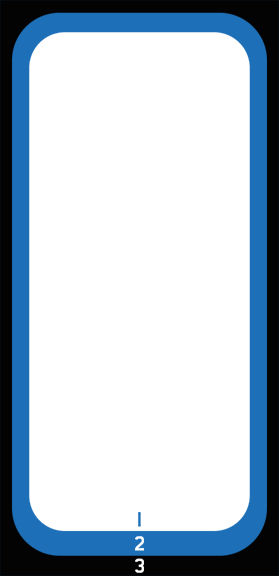
1. Design Area - 45 x 102mm
This is the area that your artwork or image should fit in to. It is the visible part of the badge.
2. Quiet Area - 52 x 110.8mm
This is the area of the badge that is partially covered by the registration plate frame. Some of it may be visible; some of it, will not be visible. The main or significant part of the artwork or image should not overflow in to this area.
3. Bleed Area - 57 x 117.5mm
The bleed is a printing term for the area of the badge that is not seen, but continues the background colour, photograph or artwork beyond the required dimensions of the badge. It ensures that no white space appears and that the print is always larger than the badge aperture.
Template
Download and use this template to prepare your artwork. Once you are ready, send it over to us for assessment, consultation and printing.
The Process
Step 1: Prepare your artwork
Download the template from the link above and prepare your artwork. If you need any further advice regarding how to create or source viable artwork for printing, please contact us.
Step 2: Submit Your Order
Submit your order using the frame builder feature on this website. Email your artwork to us at artwork@plateplus.co.uk, along with the order number you receive when you complete your order.
Step 3: Assessment & Consultation
We will assess the submitted artwork and provide any required advice and feedback regarding format, size, file-type and viability.
Step 4: Re-submission / Graphic Design
If required, re-submit your artwork following our feedback. We also offer an optional graphic design service for an additional fee.
Step 5: Proof
Once you are happy with your artwork, and we have confirmed its viability, we will send you a proof for your approval.
Step 6: Printing
Once you have reviewed and signed off your proof, we will print your number plates and dispatch them to you.